Showing posts with label 3D Art. Show all posts

Tuesday, November 10, 2020

3D : Canon

While we've separated into separate tracks now, and I plan on pursuing Tech Art, I am still interested in continuing with 3D as long as time allows. Similar to the previous assignment, the crate, this is another multi-week assignment that will end in the creation of a real-time game prop: a canon, set up in a small diorama-like scene.

As I plan on following along with the tutorials with little to no deviation, I am using Nick's reference board going forward with my canon creation.


My personal favorite was this slightly squashed cannon, so I plan on modeling mine more closely to this style.

As we were also tasked with creating a small environment, I opted to add in some palm trees and tall grasses, similar to what you see here.

WIP

WIP with added foliage and mannequin for scale.

Lo Res cannon with wireframe.

Lo Res cannon.

Hi Res cannon with wireframe

Hi res cannon.

WIP sculpt in Zbrush

Monday, October 12, 2020

3D Art : Basic Real-Time Prop

In this multi-week module, we are creating a basic real-time prop for a game - in this case a crate. We will be taking this crate through the proxy, game and high resolution modeling phases.

Proxy crate in Maya with mannequin for scale.

Proxy crates imported to UE4.

WIP building a wall of boards to make a higher-resolution crate.


High-res crate ready for export.

Crate in Zbrush ready for sculpting,

Finished sculpt.

Decimated crate for export.
Test for resurfaced lid in Maya.

High res and low res crates in Maya.

Low res UV maps.

Lo res model in Substance Painter.

Crate with base color in Substance Painter.

Finished wine crate, ready for export.

Normal map in Photoshop.

Crates in UE4.


Final result.


Thursday, October 8, 2020

Common Art: Perspective

 This week we were tasked to do the following:

  • Generate at least four buildings in Maya with which to populate a city.
  • Populate a Maya Scene File with the buildings created - additional kit bashing was permitted.
  • Build shots for one-, two- and three-point perspectives.
  • Choose our favorite shot, then render it with Arnold and composite it in Photoshop.
Examples of the different perspectives.

Instead of a traditional cityscape, I wanted a more Disney inspired village.

Buildings created in Maya.

One-point perspective.

Two-point perspective.

Three-point perspective.

Final result.


Wednesday, September 30, 2020

Common Art : Composition

This week's assignment focused on creating a composition that draws the eye and follows a set layout. We were giving the same basic kit bashing file with models created by Nick Zuccarello, and then given free reign to assemble them and render them how we wanted in Maya. It was also possible to add additional resources from Sketchfab (or to create your own additional assets).

1) choose composition type

2) kit bashing with the models that nick gave us - can change size, etc. use every element in maya file

can also photo bash and incorporate other photos, etc.

change shape of mannequin (not t-shape)

3) render (and paint out) -- already set to render toon lines (contour filter and ai tune shader)

aiRaySwitch in Environment (render settings) to make background white?

4) can find other models/add stuff to scene (sketchfab?)

5) think about fore- mid- background (and lighting scenarios)

6) find image and artist for reference where you like color harmonies

**required resolution: 3840x2160**

Composition guidelines.

Layout reference image.

Based on the props, I decided to create a little "small village" meets Blade Runner vibe.

Scene with kit bashing assets (and additional assets from Sketchfab) set up in Maya.

Example of Toon and Occlusion renders in Photoshop.

WIP

Final scene in Photoshop.

Monday, September 14, 2020

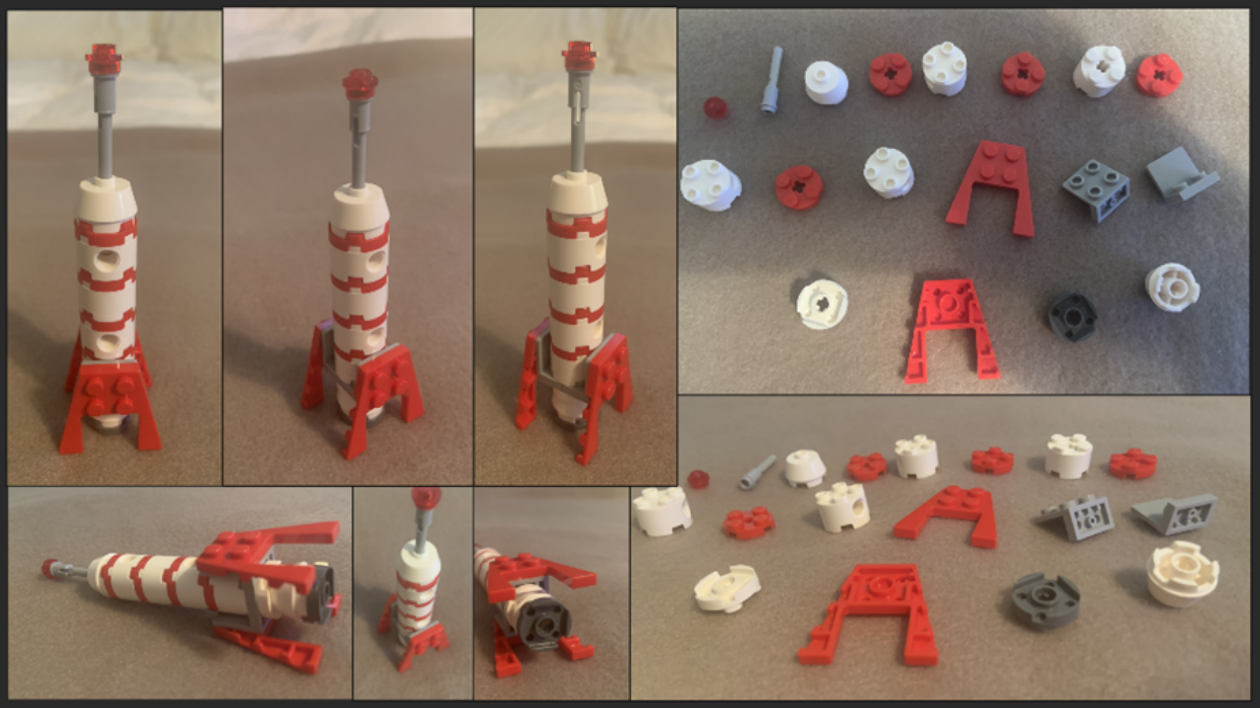
3D Art : Lego Blocks

 For our first week in this module, we were tasked with creating Legos based on specific size constraints in Maya, and then importing them into UE4. We had to choose one of six space-themed images to replicate. For the initial week, we had to create proxy models of the Lego shapes, and then import them into UE4 to create a rough build.

Lego image I selected to build.

Proxy blocks in Maya.
     
Proxy blocks imported into UE4.

Blocks with color to help differentiate them.

My initial blocking in of the Legos was pretty rough.

Improved model, WIP towards final rendered image.

Final rendered image.

Final rendered video with sequencer.


Wednesday, September 9, 2020

Common Art : Use of Silhouettes

This week's assignment focused on the importance of silhouettes for assets. We were given a model of a ship in Maya along with a reference board of images. Then we had to take a view of the silhouette of the original model and add to it within the constraints of the references given to us creating nine new images. The artist CreatureBox and the game Galaga were the main influences for this assignment.

Original silhouette of ship.

 
Reference board.

Robots by CreatureBox.

Final draft of various silhouettes with original design for comparison.

Search This Blog